How to Generate Sales Reports and GST Reports for Tax Filing: Complete Guide for MSMEs
Learn how to generate sales reports and GST reports for monthly tax filing. Master GSTR-1 preparation, payment mode reconciliation, and retail analytics.
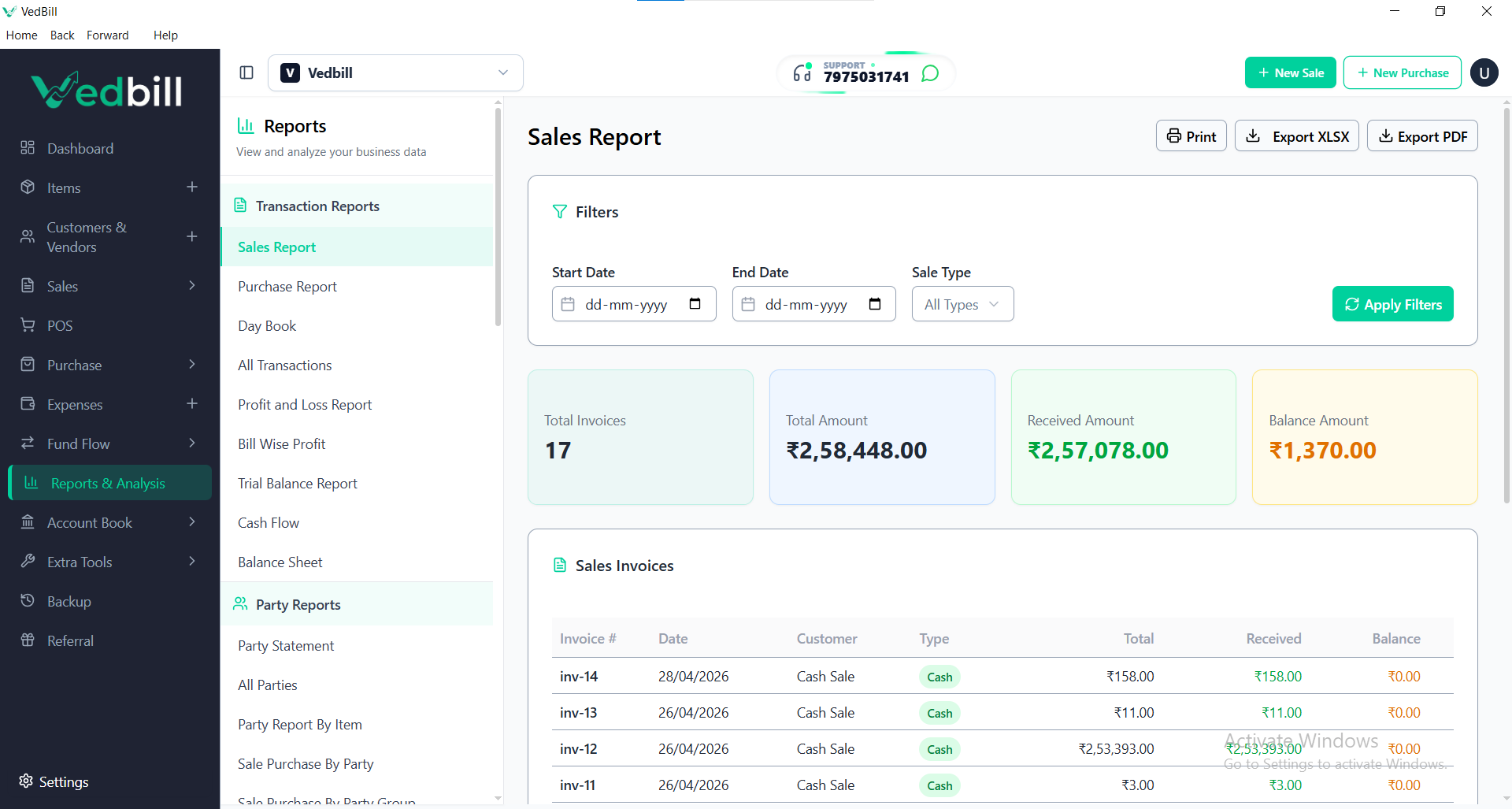
For small business owners and retail merchants in India, running a successful store requires clear visibility into daily cash flows and strict adherence to tax filing deadlines. Every month, registered businesses must reconcile sales figures, verify tax collections, and submit statutory returns (such as GSTR-1 and GSTR-3B) to the GST portal.
Yet, for shopkeepers still relying on paper notebooks or disorganized spreadsheets, tax filing week is a stressful ordeal. Sifting through hundreds of carbon-copy receipts, calculating tax totals with desktop calculators, and hunting down missing invoice numbers wastes valuable business hours and frequently leads to late filing penalties or mismatched tax returns.
Modern billing software eliminates this friction. Every transaction logged at your checkout counter automatically populates real-time sales ledgers, allowing you to generate comprehensive sales reports and GST tax reports in seconds.
Direct Answer: How to Generate Sales and GST Reports for Tax Filing
To generate sales reports and GST reports for tax filing using billing software, follow these 4 steps:
- Access the Reports Module: Open the reporting section of your billing software and select your desired reporting period (e.g., Daily, Weekly, or Previous Calendar Month).
- Filter by Transaction Type: Separate your outward supplies into B2B Tax Invoices (with customer GSTINs for Input Tax Credit) and B2C Retail Sales (walk-in consumer cash memos).
- Review Tax and HSN Summaries: Verify the aggregated taxable amounts, split by tax slabs (0%, 5%, 12%, 18%, 28%) and tax types (CGST, SGST, IGST), along with HSN code summaries.
- Export to Excel: Export the structured summary directly into Microsoft Excel format and deliver it to your chartered accountant or tax consultant for portal upload.
Using VedBill, generating audit-ready GSTR-1 summaries and daily payment reconciliations takes just two clicks on your Windows desktop.
Why Accurate Financial Reporting Is Critical for Indian MSMEs
Maintaining disciplined sales and tax reports is essential for both regulatory safety and strategic business growth:
- Eliminate Late Fees and Interest Penalties: Under Section 50 of the CGST Act, late GST filings or under-reported tax liabilities incur mandatory interest charges and daily late fees. Instant automated reports ensure timely filings every month.
- Prevent Customer Input Tax Credit Disputes: If your business issues B2B invoices to wholesale buyers, any mismatch between your invoice data and your GSTR-1 return will block your buyers from claiming Input Tax Credit (ITC), leading to delayed payments and strained relationships.
- Monitor Daily Cash Flow and Payment Mode Reconciliation: Compare counter cash collections against UPI payments (PhonePe, Google Pay) and card settlements to detect counter theft or unrecorded transactions immediately.
- Identify Profit Drivers and Dead Stock: High-level sales reports reveal which product categories deliver the highest gross profit margins versus which slow-moving lines tie up working capital.
Anatomy of a Complete GST Reporting Package
When preparing your monthly tax filings, your chartered accountant requires specific structured data:
1. B2B Outward Supplies Table (Table 4 of GSTR-1)
Contains all sales made to registered businesses, including:
- Customer Legal Name and 15-digit GSTIN
- Invoice Number and Invoice Date
- Total Invoice Value and Taxable Value
- Place of Supply (State Code)
- Applicable Tax Rate and Tax Breakdown (CGST, SGST, IGST)
2. B2C Large and Small Outward Supplies (Tables 5 & 7 of GSTR-1)
Aggregated totals of sales made to unregistered retail consumers, categorized by state of supply and applicable tax rate.
3. HSN-Wise Summary of Outward Supplies (Table 12 of GSTR-1)
Mandatory breakdown of sales categorized by Harmonized System of Nomenclature (HSN) codes, displaying total quantities, total value, taxable value, and tax amounts per code.
4. Document Issued Summary (Table 13 of GSTR-1)
A chronological record of serial numbers issued during the tax period, showing starting number, ending number, total count, and any cancelled invoices.
Essential Business Management Reports Every Retailer Needs
Beyond statutory tax returns, billing software generates practical management analytics that help you grow your business:
| Report Type | What It Tracks | Strategic Business Value | | :--- | :--- | :--- | | Daily Sales Summary (Z-Report) | Total sales, tax collected, discounts given | Daily counter cash reconciliation at store closing | | Payment Mode Breakdown | Cash vs UPI vs Credit Card vs Store Credit| Ensures digital bank deposits match counter records | | Category-Wise Sales Report | Revenue and units sold per product category | Reveals top-performing store sections | | Item Margin Analysis | Purchase cost vs selling price per SKU | Identifies highest-profit merchandise | | Customer Credit Ledger | Outstanding credit balances per customer | Accelerates collection of pending receivables |
Step-by-Step Walkthrough: Exporting Monthly GST Reports in VedBill
Here is the exact procedure to generate your monthly tax reports using VedBill:
- Step 1: Open the Reports Tab: Launch VedBill on your Windows PC and click on the "Reports" module in the main navigation.
- Step 2: Select "GST Tax Report": Choose the GSTR-1 sales summary view.
- Step 3: Define the Date Window: Select the first and last day of the preceding tax month (e.g., October 1 to October 31).
- Step 4: Verify Invoice Numbering: Review the displayed invoice list to confirm that all serial numbers are consecutive and that any cancelled bills are documented.
- Step 5: Click "Export to Excel": The software instantly compiles all transaction records, tax splits, and HSN codes into a clean, formatted Excel workbook ready for your tax consultant.
Pre-Filing Checklist for Indian Shop Owners
Complete this checklist before submitting your sales records to your accountant:
- [ ] Are all invoices from the first to the last day of the month included?
- [ ] Have all cancelled or voided bills been accounted for in the serial sequence?
- [ ] Do all B2B corporate transactions have valid 15-digit customer GSTINs?
- [ ] Does total counter cash match the cash sales report after subtracting expenses?
- [ ] Have UPI and card settlement bank deposits been reconciled with digital sales totals?
- [ ] Has an Excel export been safely saved to your local drive or sent to your auditor?
Comparison: Manual Bookkeeping vs Automated Reports in VedBill
| Comparison Metric | Manual Paper / Spreadsheet Bookkeeping | Automated Reports in VedBill | | :--- | :--- | :--- | | Report Generation Time| 4 to 8 hours of tedious calculation | Under 5 seconds in two clicks | | Calculation Accuracy | High risk of human mathematical error | 100% mathematical precision | | HSN Code Compilation | Painstaking manual sorting of receipts | Automated grouping by HSN code | | Audit Readiness | Messy piles of paper carbon copies | Clean, structured Microsoft Excel export | | Accountant Fees | Higher fees due to messy, unorganized data| Lower fees due to pre-formatted clean data |
The VedBill Solution: Fast, Stress-Free Reporting
VedBill transforms accounting and reporting from a monthly headache into an automated, effortless routine:
- One-Click GSTR-1 Excel Exports: Generate pre-formatted sales summaries categorized specifically for Indian GST compliance.
- Comprehensive Daily Z-Reports: Reconcile cash, UPI, and card payments in seconds at the end of each business day.
- Item and Category Analytics: Gain clear insights into top-selling products, slow-moving items, and gross profit margins.
- 100% Offline Privacy: All sales records and customer ledgers remain securely stored on your local PC hard drive.
- Completely Free Forever: Access unlimited financial and tax reports without recurring subscription fees or locked paywalls.
Frequently Asked Questions (FAQs)
1. Can my chartered accountant directly use the Excel report exported by VedBill?
Yes. VedBill exports sales records in a clean, standardized Excel format that neatly separates taxable value, CGST, SGST, IGST, and customer GSTINs, allowing accountants to import the data directly into GST filing utilities.
2. Does VedBill generate daily closing reports for counter staff?
Yes. The Daily Sales Summary (Z-Report) compiles all transactions completed during the day, breaking down totals by payment mode (Cash, UPI, Card) so store owners can balance the cash drawer in minutes.
3. Can I generate reports for a custom date range, like a single festival week?
Yes. You can select any custom start and end date in VedBill to analyze sales trends during festivals, seasonal promotions, or specific marketing campaigns.
4. What should I do if a bill was entered with the wrong customer GSTIN?
VedBill allows authorized administrators to edit customer details or issue credit notes, ensuring that historical records reflect correct tax information before final monthly reporting.
Conclusion & Next Steps
Accurate financial reporting gives you complete visibility over your business performance and ensures stress-free tax compliance. By letting your billing software track every rupee and calculate tax liabilities automatically, you free yourself to focus on serving customers and growing your store.
Simplify your sales and GST reporting today.
Download VedBill Free for Windows Desktop and experience effortless tax filing and powerful retail analytics.
Manage Your Store with VedBill Desktop Software
VedBill is 100% free desktop billing software built for retail shops, supermarkets, pharmacies, and small businesses in India. No recurring subscriptions or expensive cloud fees.
VedBill Editorial Team
Retail & Billing Specialist at VedBill




